
how_to_export_specific_channels_in_mattermost.md (3651B)
1 --- 2 title: Mattermostの特定のチャンネルをexportする方法 3 tags: 4 - export 5 - mattermost 6 private: false 7 updated_at: 2026-02-26 21:10 8 id: null 9 organization_url_name: null 10 slide: false 11 --- 12 # 総集編 13 ### ログイン(トークンの取得) 14 ```bash 15 curl -i -d '{"login_id":"username@example.com","password":"thisbadpassword"}' https://yourdomain/api/v4/users/login 16 ``` 17 ### export 18 ```bash 19 curl -i -H 'Authorization: Bearer TOKEN' https://yourdomain/api/v4/channels/CHANNEL_ID/posts -o mattermost-export.json 20 ``` 21 22 # 想定読者 23 ~~Mattermostの新たなFreeEditionへの規制の追加で~~Mattermostの提供が終了するため,履歴をexportしておきたい方 24 25 # 詳細な手順 26 27 ### ログイン 28 アカウントでログインします. 29 アカウントのアクセス範囲にあるAPIが叩けるようになります. 30 ```bash 31 curl -i -d '{"login_id":"username@example.com","password":"thisbadpassword"}' https://yourdomain/api/v4/users/login 32 ``` 33 もちろんのこと,username@example.comとそのpassword,yourdomainはexportしたいMattermostのURLのドメインです. 34 成功すると以下のようなレスポンスが返ってきます. 35 ```bash 36 HTTP/2 200 37 date: Thu, 26 Feb 2026 11:15:29 GMT 38 content-type: application/json 39 content-length: 772 40 permissions-policy: 41 referrer-policy: no-referrer 42 token: TOKEN 43 vary: Accept-Encoding 44 x-content-type-options: nosniff 45 x-ratelimit-limit: 101 46 x-ratelimit-remaining: 100 47 x-ratelimit-reset: 1 48 x-request-id: X-REQUEST-ID 49 x-version-id: 11.0.7.20090702019.12a90a33d692853deafd8a4c7a7162684aa60dfcb310709dd96061b261c1b24b.false 50 cf-cache-status: DYNAMIC 51 nel: {"report_to":"cf-nel","success_fraction":0.0,"max_age":604800} 52 report-to: {"group":"cf-nel","max_age":604800,"endpoints":[{"url":"URL"}]} 53 server: SERVER 54 cf-ray: CF-RAY 55 alt-svc: h3=":443"; ma=86400 56 57 (以下,ユーザーの詳細) 58 ``` 59 これの上から7行目`token:`の後ろにあるのが,貴方の一時的なアクセストークンです. 60 61 ### `channel ID`の取得 62 `Channel ID`はMattermostのUIから確認することができます. 63 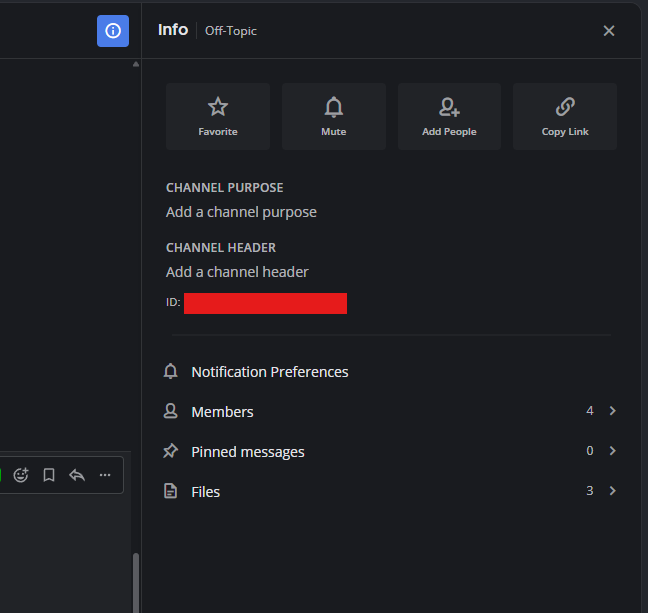 64 当該チャンネルを開いて,右上のinfoマークを押したら,画像のようなタブが出てきます. 65 これの赤く塗りつぶした部分,ここにチャンネルのIDが表示されています. 66 参考文献の2にはAPIだけでチャンネルのIDを取得する方法が掲載されています. 67 ※チャンネルIDは任意の文字列です.チャンネル名やチャンネルのURLとは異なります. 68 69 ### エクスポート 70 ```bash 71 curl -i -H 'Authorization: Bearer TOKEN' https://yourdomain/api/v4/channels/CHANNEL_ID/posts 72 ``` 73 この`TOKEN`は先程ログインのときにもらったものです. 74 yourdomainは引き続きexportしたいMattermostのURLのドメインです. 75 そして`CHANNEL_ID`は先程説明したチャンネルIDです. 76 そうしたらJSON形式で降ってきます. 77 cURLではファイルをエクスポートすることができます. 78 エクスポート後のファイル名を`mattermost-export.json`とすると 79 ```bash 80 curl -i -H 'Authorization: Bearer TOKEN' https://yourdomain/api/v4/channels/CHANNEL_ID/posts -o mattermost-export.json 81 ``` 82 とできる. 83 84 # 参考文献 85 1. [Mattermost API Document](https://developers.mattermost.com/api-documentation/) 86 2. [Mattermost Forums ~How do I extract posts from a Mattermost channel?~](https://forum.mattermost.com/t/how-do-i-extract-posts-from-a-mattermost-channel/6285)